Showing posts with label TOOLS. Show all posts

Monday, 2 December 2013

EmoSPARK - First Artificial Intelligence (A.I) Home Console

One of the most desirable things that humans have always wanted to do is pass their emotions to inanimate objects.This has been now made possible through a Revolutionary Artificial Intelligence console Emospark. The Emospark is a Bluetooth/Wi-Fi android cube that lets you to transfer your emotions(like anger, happiness, pain) to it.

This is done through complex Artificial Intelligence Algorithms. One of the ways that these emotions are captured is through facial recognition softwares. This helps the cube profile and store an individual’s unique behavior  and reactions and through this is able to create a unique Emotional Profile Graph for each user. Through time and through learning how an individual reacts to different stimuli, the cube is able to feel what you feel for example pain and pleasure.


What Can EmoSPARK do?

  • The Emospark is then able to answer and project answers in over 39 million topics.
  • This cube is designed with over 2 million lines of data.
  • It is an Android powered cube that allows users to create and interact with an emotionally intelligent device through conversation, music and visual media.
  • Measures your behaviour and emotions, then intrun creates an emotional profile which will help you in keeping yourself happy and healthy.
  • EmoSPARK can feel an infinite variety in the emotional spectrum based on 8 primary human emotions, Joy, Sadness, Trust, Disgust, Fear, Anger, Surprise and Anticipation.
The EmoSPARK IndieGoGo Campaign And this December, you can play an even bigger role in bringing EmoSPARK to life. In 27 days, the EmoSPARK IndieGoGo campaign will begin. People who are interested and sign up now will receive information about how to get a $25
discount when the IndieGoGo campaign starts, as well as information about becoming one of the 133 members of the EmoSPARK guild. Sign up for Emospark and be a part of bringing EmoSPARK to life!

Sunday, 24 November 2013

Convert Video Files to your Desired Format (3GP,AVI,VOB etc) using Format Factory

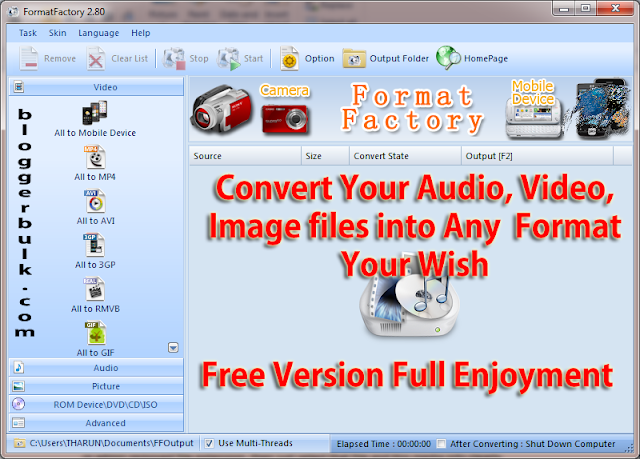
Looking for a software to convert your video files to audio? Searching for best software to convert videos into any format like .3gp, .avi , .mp4, .vob and much more. Worried about software that converts images from .png to .jpg or .gif or any other format into you required format then all in one software named as " Fomrat Factory " is ready for you to use it for free. The name of this software indicates that this software is factory where you can play with converting your files into any format.


Format factory is well used software all over the world for file conversions. I have been using this software to convert large size photos ( .JPG ) into small size without any loss of clarity. I personally have good experience with this software and looking to give full information on how to use format factory ?

What you can do with Format Factory ( FF)?

In factory you can do anything regarding its usage. You can do what want to do it for your files. Convert images from large size into small size. Convert video files into audio file (.mp3, .wma, .aac, .ogg and many more) Cut particular scene from video Convert any image format into ( .jpg, .png, .gif, bmp, .ico, tga, .pcx) formats Convet DVD to Video File Music CD to Audio File DVD to ISO and CD to CSO.

I know you are personally using many other software programs and don't want to trust any other software programs. But give me a chance to prove this is the best all in one software for file conversions. So using software for video conversion, software for audio conversion and software for image conversion. Don't you think of your ram memory for all files and hard disk space. Just use this software and you surely love and continue in using this software.

What are advances features of this software?

As I told above this video conversion software has some good advantages like cut particluar scene from film using time to time or normal adjustment. You can add video to one after another easily. This allow you to join audio files.

Media Info is a special under advanced settings. This media info options give full details for selected clip. For example when you found a media file but don't how to see file extension or admin removed file extension, then just select that file and this media info clearly explains about the file size, file format, duration of clip, bit rate, width and height, aspect ration and much more.

Demo to convert video format :

Let get into tutorial and change format of selected video into another. Just open Format Factory software, click on Video and choose what format the output file should be. If you want the output of file to in mp4 click on All to MP4


Now in a pop up click on Add file, choose file, in output settings you can customize settings for output file. Also check output folder at bottom. Now click on Ok


Now last step to convert .mp4 file to other format. Click on Start to start your project for converting. After finishing you see 100% and also a pop up notification at right bottom. You can now visit your source folder and find that your file is successfully converted.

Demo to check full information of any file :

Now let we also see how to find file extensions of any file related to media. Just open FF and click on Advanced >> Media info >> Browse for any file and select it.

About Guest Author:Hello Buddy! Tharun here, admin at Blogger Wordpress Tricks . I love to share software tricks, android apps, SEO Tricks and Money Making from blogging. I do love if you could visit my blog.

Friday, 1 November 2013

4K Video Downloader Review

We daily watch many videos online especially on Youtube. There are many tools online to download videos but most of them doesn't help to download high quality videos i.e in HD quality.Here we are introducing a new youtube video downloader using which you can download high quality Youtube videos and watch them offline.

How to Use 4k Video Downloader?

This software program is very simple to use and very straight forward.Just follow the below steps to get started.

  • Download the software program and install it.
  • You will notice a quick launch icon on your desktop.
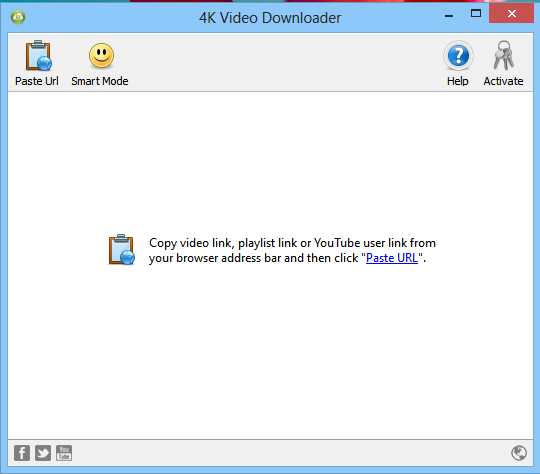
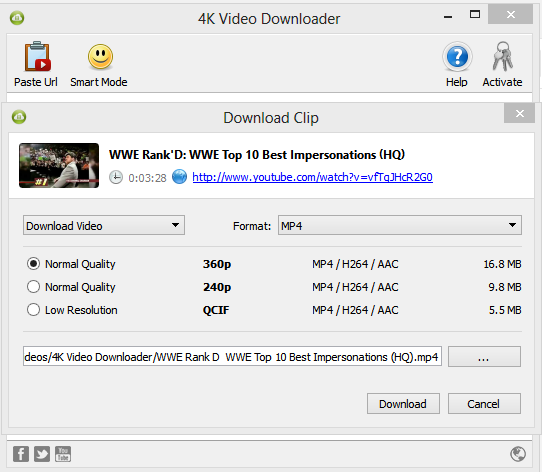
  • When you launch the tool you will see something as below.

  • All you have to do is to get the link of the youtube video you want to download.
  • Then right click and paste the link over the dashboard.
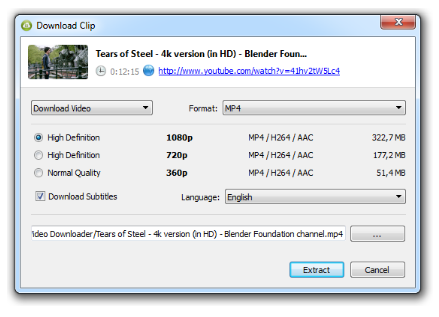
  • Now a window will be popped up asking you for the quality of the video which you want to download.

  • You can also choose the format of the video like MP4 , FLV ,3GP etc.
  • So you can also download videos that are compatible for your mobile.
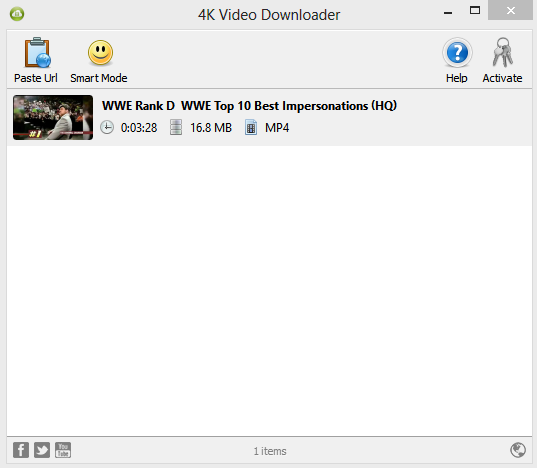
  • Once you have selected your choice of quality of the video, hit the download button for the video to download on to your PC.
  • The Video will be download onto your PC very fast.

Last Words:

If you are looking forward for some good software program to download youtube videos directly onto your pc without any difficulty in your desired format then I highly recommend this software program.
Download 4k Youtube Video Downloader

Wednesday, 30 October 2013

Create Your Own Meme Online With These Free Tools

A meme is an idea, style, or action that spread person to person through Internet. A meme might be considered as a mimicked theme. The Internet meme can be a video, an image, website or any other theme. It will spread person to person through social media, websites, blogs, email, and news sources. They might relate different Internet cultures and sub cultures. The Internet memes are far much better than general memes as they can easily mark their footprints to social media that makes it analysable and traceable.

History of Meme

Richard Dawkins introduced the word meme in 1976 in his popular book- The Selfish Gene. He attempted to explain the cultural info spread by the means of word meme. Meme originally had come from a Greek world Mimema, which means something, imitated. The internet meme are the sub streams of general meme and is totally based on concept of specific culture and environment. In the year 2013, Dawkins characterized the internet meme as a meme that is consciously altered by humans and their creativity. He also added that the internet memes are just hijacking of the true ideas that had made the memes mutated and given a new direction to them.
Most of the memes are humor-centered these days because humor reaches to most of the people and appears very attractive. Some internet memes are about drams, shock-value, social commentary, deep content,super heros and intellectual absurdity. These memes are spreading among people in virus like fashion. Internet memes were first born on Reddit and 4chan. This made the developers to think about creating the meme tools for designing the memes to increase the graphics and make them more innovative. If you are eager to design the internet memes then here are meme makers for you. Let us have a look over the popular meme makers.

Best Tools to Create Meme's for Free Online:

Imgur


Probably one of the best tool I found to create memes online.It has an inbuilt tool called 'memegen'.This tool has great features using which you can select multiple text layers.Once you created a meme ,the image will be automatically uploaded to the imgur gallary .You can share the link on social networking sites or you can also embed the image.Even you can download the same on to your pc.

Rage comic builder


Rage was a popular comic series that featured characters like Me Gusta Guy and Forever Alone Guy. You must use this tool, if you prefer to work with Rage Guys. The tool is brought ti you by CheezBurger Network and Memebase.com.

QuickMeme

It is just like memegenerator.net. You can easily browse the most popular memes through home page in the featured list. You can also design random memes and you favorite memes. You just need to click ‘make a meme’ in order to browse different memes and then select the image and start designing your own caption.

Memegenerator.net

This is the most popular toll to design meme. You can also browse to the memes that are created by others and can look to different images, characters that are newest and popular. Just click to ‘generate an image’ and start creating your own meme.

DIYLOL


The popular meme maker stands for ‘Do It Yourself’ and ‘Laugh out Loud’. It will allow you to create star ratings ob meme and upload the image for meme and fill the captions. It also has an iPhone application for memes that will cost only $0.99 to be installed and you create the memes.

Troll.me

It is a great meme generator, which looks similar to zipmeme. You can also create account, login, memes and browse through variety of memes. You can put on just everything on your memes.

Meme Center

This is a particular type of meme generator, which allows you to create moving images (GIF). You must sign up a free account before starting this tool. Then you can start designing your meme by uploading the image to GIF maker or meme builder tool.

Meme Creator

This tool was started by memecreator.org, which moved to memecreator.com. Users can easily access both of the sites to use meme maker tools. There are simple option on the top of the menu- Home, Create, and Browse. You can select from the bunch of meme themes by using create option.

IB Memes

The service is given by Tumblr blog. You can select ‘create meme’ option from the menu top. It is a simple meme generator tool.

So if you are interested in designing the meme, choose any of the tools from above option. They will help you to design the best meme.If we missed out any do let us know in your comments.

Friday, 27 September 2013

How to Tell if a Website is Reliable or Not

Many people ask me whether we can trust a particular site or not.Especially the sites which are related to Shopping,Jobs, Making Money Online etc.Though we cannot completely judge the reliability of  a website by just seeing it ,there are few tools that helps to judge the trust factor of a website.In this article I listed some best tools and few suggestions.

How to Judge if a Website is Trustworthy or not?

1.WOT(Web Of Trust):

Web of trust is an extension available for almost all the major browsers like Google Chrome ,Firefox ,Internet Explorer etc.
  • Go to mywot.com
  • Download the extension for your browser.
They collect the opinion from various people over Internet from the experience they got from the website.Users can also comments rate the website or a blog.If a website gets too much negative feedback that specific site will be marked as spam.

This plugin is tightly integrated into your browser and shows up the WOT of a particular site right when you start searching in google for a  particular query.The below is an example of the search.

  • Green indicates the site is completely safe.
  • Yellow indicates Spam or sometimes low rating.
  • Red indicates the site is Scam.
The next time when you browse a site do check this extension to confirm whether a site or the information provided by the site is reliable or not.
In most of the cases WOT give good information but for some new sites or the sites which are not rated by many users ,in such cases the information might not be accurate.

2.Site Design:

A good website definitely has a clean clutter free design.If the site design is bad and not properly formatted then you must stay away from such sites.

3.Authors and Admins:

If a blog or website is maintained by someone anonymously then there is something fishy out there.There are many such sites who provides information anonymously .Such type of sites can be misleading most of the time.

4.Page Rank and Alexa Rank:

Page rank and Alexa Rank are two completely different algorithms to rank a website based upon its traffic and link authority.
In most of the cases website with a good Alexa Rank and Page Rank are reliable.These two factors indirectly says a website is reliable.
Page Rank is a scale of 0 to 10 .Higher the better.
Alexa Rank is a web information company which ranks every website based on few factors.
The listed are some ways using which you can find out the trustworthiness of the websites .If you are following any other way do let us know in your comments.

Thursday, 26 September 2013

How to Check if a Website is Down Just for you or Everyone

  • Sometimes you notice many sites not opening in your browser.This commonly happens with the popular social networking sites like Facebook,Twitter ,Stumbleupon etc.But you might be in a doubt whether if the particular site is down for just you or else everyone?
  • Whether the site which you are trying to open not opening just for you or else everyone?
To find this there are some online tools readily available.In this article I will be sharing couple of them to check if the site is down for all or just you.

1.IsItDownRightNow.COM:

  • Now this will show you a message if the website is up or down.
Twitter lookup using isitdownrightnow

2.Down for me or everyone:

This is one more interesting tool which shows if a website is down for just you or everyone.

Check the Up Time of Some Popular Websites:

Here is one more tool which constantly checks if a site is up or down.Go to website downrightnow.com ,this website collects the data of some popular sites like Twitter ,Facebook ,Blogger and Livejournal.This tool also shows if there is any maintenance downtime going on for popular websites.

Conclusion:

With the above listed websites you can find if the site is down for just you or everyone.If the site is down for just you then it might be your browser problem or you might have blocked the site or sometimes it might be the problem with your ISP(Internet Service Provider).There are many sites to find this but the listed are best sites.Do let us know if you have any doubts in your comments.

Sunday, 4 August 2013

View any Unknown File Extension with Windows File Viewer Free Program for Windows PC

  • Sometimes you find it difficult to open few unknown file formats with some unknown extensions.
  • Or sometimes you might not have a specific software installed on your PC like Microsoft Office of Adobe Photoshop to open some file and view it.
  • If you are facing any of the above issue then the below listed software program will solve your issue.
Windows File Viewer is a simple program which is available for free that helps you to view any file with almost 100+ different file extensions.This make your job easier to open files with some strange formats because every PC might not be having all basic software programs installed.

What is File Viewer?

File Viewer is a universal file opener that allows you to open any file on your Windows PC. Simply drag and drop any file or folder onto the application icon or program window. File Viewer can open PDFs, word processing documents, spreadsheets, and many other common file types in their native view. It also can play dozens of audio and video file formats.
If you have a unknown file, File Viewer can open it! In the rare case that File Viewer does not natively support the file format, you can still view the contents of any file in text or hexadecimal view.

Steps to Get Started Using Windows File Viewer:

  • First go to Windows file Viewer Official Site
  • Then Download the software program from their site which is for free.
  • Once you download the software program install it on to your PC.
  • After the installation is finished you will notice File Viewer shortcut Icon on your Desktop.
  • Just run it to get started using File Viewer.
  • Now just drag and drop the file which you want to open via File Viewer.

Some More Features of Windows File Viewer:

  • Can open upto 140+ different file formats.
  • Works perfectly on all the windows OS like XP,Vista,Windows 7/8 as well.
  • You can check the various file formats it supports over here
  • It also plays videos of different formats with a single drag and drop option.
  • You can Open Documents,Play Multimedia Files,View File Information,Copy File Data.
  • You can view the files in 4 different views namely Native View,Text View,Hex View and Icon View.
  • Do check out the Complete Features of Windows File Viewer

Conclusion:

Like the 25+ Basic Software Programs I mentioned for Windows users this software program is also one of the most essential program as we encounter various types of file formats while using PC and might find it difficult to use.

Saturday, 3 August 2013

Bugscore :Score (Rate) the World Around You

Bugscore is the first unique platform to score(rate) everything in this world like Actors,Politicians ,Entrepreneurs,Products ,Websites etc.You can either score on Bugscore.com or on any third party website via thier ‘Score’ button which can be added to your site via access to the Bugscore API.

Bugscore Primarily Covers the Following Categories: 

  • People (over 12,000 occupations including actors, politicians, athletes, business people, lawyers,journalists, freelancers any many more).
  • Products (over 500 product types including gadgets, vehicles, cars, airplanes, toys, apps, video games,movies, songs, foods, fashion items and many more).
  • Businesses (many types of businesses in 63 sectors including startups, multinationals, privatecompanies, listed companies, cafes, restaurants, hotels, schools, universities, bands, music groups and many more).
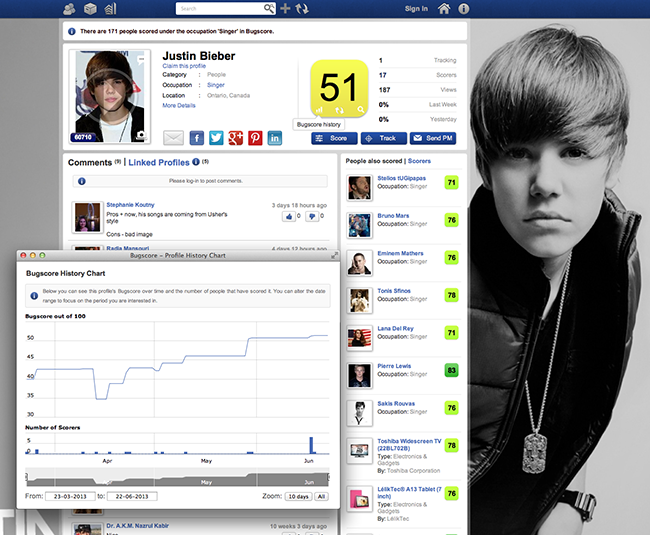
Justin Beiber Profile on Bugscore
There are currently 225,000+ people, products and businesses in our system with our small but budding community of  1,200 users. Bugscore.com launched on March 21st, 2013.Within the few months of its launch it has gathered a lot of buzz in social communities.

How to get Started with Bugscore:

Bugscore has a very clean and user friendly interface.Getting started is pretty much straight forward , just follow the below quick steps to get started right now.
  • Go to Bugscore Homepage
  • Hit on Sign in .As you are a new user you have to signup for a free account before getting started by hitting the signup link.
  • Once you hit the signup button you will be asked whether to sign up as a Person or Business.
  • If you own a Business ,Product or a Website then go ahead and Signup as Business  and then fill out the details in the next window to get started.Or else if you want to create a profile for your own then choose person option and move on with the sign up process.
  • You can also signup with your existing Facebook,Twitter ,Google Plus or Linkedin Profiles.
  • You can also link your various profiles like Facebook,Google Plus ,Twitter ,Youtube ,Linkedin etc profiles with your Business or Personal account.
You can check All Tech Buzz on BugScore and you can check my profile on BugScore. Feel free to rate our site on Bugscore. 

My Profile on Bugscore

How to Rate a Business/Product/Person on Bugscore: 

To rate a brand/person/product visit the profile on Bugscore.There you see a score button on each profile.Hit on the score button and score the profile for various metrics.

About BugScore Button:

You can score on Bugscore.com or on any third party website via their ‘Score’ button which can be added to your site via access to the Bugscore API. Their mission is to make the World a more transparent place and quantify consumer opinion on everything.
We have also implemented the Bugscore button on our site to know the opinion of our readers regarding our site and our products.You can either use the score button to rate products or website or even articles on your site.

Steps to add Bugscore Button to your Blog/Website Right Now: 

  • After you signin to your account you will see a button on the top right.
  • Just click on it and choose Add Scoring form the drop down.
  • After open Add Scoring you see three different options.Choose the one that best suits your need and click on Generate.
  • Now you will get a javascript code.Place the code in appropriate place to show up the button.
We have also implemented the Bugscore Button on our site to track the opinion of our visitors and improving our functionality by tracking their interests.The score button looks as follow on our right side bar.

Some more Additional Features of Bugscore:

You can link different profiles of your company or business right from your dashboard.


  • For example All Tech Buzz is my primary website and I own 10+ other different blogs then I can add those different blogs as subsidiary or linked profile right under my All Tech Buzz comapany.In this way if you own a company and has various subsidiary products you can add all of them under one profile.
  • Not only products you can also include the various employees working in your company along with their designation as linked profiles.

You can also add and analyse the performance of your competitors right from the dashboard.


  • If you have any specific competitors.Either one or more.You can add them in the competitors segment and analyse your performance with their performance.
  • In this way you can easily know the opinion of users and what you are lacking behind form your competitors and work on the same.

How BugScore can Help A Business or Product:

Bugscore button makes it easy to understand the opinion of visitors of a site/business or product.Instead of conducting polls and surveys you can track the opinion of your visitors using this one click button.
  • The other main functionality of this button is it lets you to understand your competitors.You can add your competitors in the industry right form the Bugscore dashboard and compare your score with their scores.This helps you to understand better what you are lacking and work on the improvement of the same.
  • Another reason to add Bugscore button is that the blog can start earning revenues in the medium term as they store data on their behalf on the opinions of their users on various products, people, businesses.This data can be sold to advertisers,market research industry and manufacturers so the blog essentially becomes a revenue Affiliate of Bugscore.

How Bugscore can help normal Users:

As it is a transparent opinion based system you can understand which product is better and which has more credibility among users and go with the same.
For example if you take the mobile industry the two best competitors when coming to the operating system are IOS and Android.If you are planning to buy a new Smartphone then you might be in a confusion which OS to choose.Using Bugscore platform you can find the rating or score of each os and compare which has got more score for a specific need.You can easily compare both and choose the best OS that best suits for you.

Conlcusion:

Bugscore is a very unique and innovative concept which helps both users and various business people to find the quality and score of the product/profile/company in the market.Though we have a vast social media these days but still the social networking sites lack in rating of various profiles based upon the users interest.
Visit Bugscore-Click Here
Do let us know your opinion on Bugscore in your comments.Happy Scoring :)

Wednesday, 3 July 2013

Facebook Animated GIF Images/Picture Sharing Tool

Recently we posted article on "How to share animated gif images on Facebook".In this post we are
introducing a tool to share animated gifs directly on Facebook without the hectic process.

You can share GIF images to Facebook directly from the below Tool:

Note:For a quick demo check video at the end of the post or click here.


One of my good friends and blogger ,Nitin Maheta from Making Different sat down to design the above cool tool to share animated gif images directly on Facebook.I am very much impressed with this tool and thought of sharing the same here.

Check the Below Video for a Quick Demo

Final Words:

Let us know what do you think regarding this tool in your comments.We will be updating this tool with some cool features .So don't forget to bookmark this page.

Thursday, 2 May 2013

International Conference Call provider Enhances Communication

Conference calls can smoothen the functioning of the business in a cost effective manner. With the help of international conference call provider, they can conduct meetings anywhere round the globe with visuals. It surely makes a big difference for the professionals especially, who have the creative juices to pour. These conference calls can also help you conduct seminars sometimes, referred to as ‘webinar’. Hence, if you are in India and the seminar is in the US, you do not need to take almost 20-hour flight to attend it, thanks to the free conferencing.
Once can enjoy the benefits of conferencing easily, as all you require is mobile phone, computer and internet access. Simply, register yourself for the service and get going for unlimited conference calls. It helps to connect more than two people with the help of phones giving them enough time and space to share files, videos and presentations as well.
There is a plethora of advantages, which an international conference call provider has to offer and is beneficial for any business to expand. The host and members in the conferencing can record their meetings and this option is immediately available after you have finished with your call. This is not it; they can share power point presentations as participants and can see the presenter’s screen as well.  Moreover, it also facilitates to take control over another member’s desktop (only if they give access). This comes handy, if you would need a technical help with your laptop or PC. The participants can easily chat during the presentation and can choose to have a private chat. Further, if the conference includes more than one presentation or single presentation with many speakers hence, access can be shifted temporarily to another participant as their turn arrives.
To keep the seminars lively, participants can use a variety of emoticons to express. It is very effective for a creative team who are coming together to call for brainstorming. Besides this, there is a poll facility where members can vote, helping them to retain their concentration. These call conferencing does have an option to broadcast your own videos to the world, with the help of webcams. The system has call codes that would avoid any calls, which you do not want to take. The calls are clear with good sound quality.
You can almost have over 100 participants in one conference call reducing the cost of such conferences in a major way.  In no time, conferencing call has an ability to become an imperative part of your business. Apart from that, you may also talk to your beloved wife who is in France and conference it with your kids residing in Singapore. Hence, it has a power to connect the whole family with one call that has become quite impossible, considering the busy schedules we have today! It can help to bond the family relations and can fill the gaps between the family members. The main motto of international call conferencing is to be able to communicate professionally and personally in a clear and concise manner. Click here to know more.

Monday, 29 April 2013

Skype Standalone Installer Free Download

Skype is a powerful medium to communicate with your beloved once no matter in any part of the video.It is powerful video calling messenger using Internet.It gives freedom to call any part of the world and offers many other premium services for free.
Skype not only works on Windows but also Mac , Linux and many other Operating systems.
You also can connect with your Facebook friends through Skype. See your Facebook newsfeed, update your status, comment and like direct from Skype.

Advantages of Skype Offline Installer:

  • With offline installer you can install skype even without internet connection.
  • This is the best way to install if you are trying to install the software on multiple computers.
  • If you have a slow internet connection then your installation may take long time.In such cases it is very much advised to go with offline installer.

Improvements made in Skype Latest Version:

They have made many improvements over the previous versions like Accessibility ,Tooltips , File sending , Localization ,Call Quality Guide etc.

Free Download Skype 6.3.0.105:

Sunday, 31 March 2013

Top 8 Financial Management Tools for better Money Handling

“Some things just work better while some others best”-Anonymous
Be it personal or business related, everyday expenditures if not limited may topple the “whole ship”. This is how tracking expense has become vital for personal as well as business success.
Several online tools are available for tracking and recording  all sorts of expenses with high accuracy, that can be retrieved instantly every time you need. How you can choose one, that suits your needs best from a big crowd. Here lie’s the challenge. Let us go through some major expense management tools available online.These tools vary from each other with its features,Portability,Security,Usability Etc.Some of them are free and some are Paid.
Anyway its good to try these if you are having difficulties in managing your money.

Best Online Financial Management Tools:

1.Tistify

It is one of newly launched expense management tool known for its simplicity. Its flexible for personal as well as business users. You can enjoy the service for free. The tool is very easy to use and you can add expense and income in separate pages. You can get solid report. If you need custom reports you have the option of adding customised categories and tags. The tool is now in its β version and is on the path of development and so you can expect more. No support is needed to use the simple yet effective tool for a beginner, still they provide active customer support and a detail help page. It is perfect and flawless for personal or small business use and we can expect an immediate update from Tistify home.

2.Certify


A comparatively better tool available for fulfilling your expense management needs. Features seemed to be ideal for complex business organisation's. Fast method to store and quick way to retrieving data are its peculiarity but you have to pay for enjoying its pretty good features.
It has automated expense management process which  automatically extracts data about expense from any receipt image. They offer varied options such as certify E-receipt and certify spend smart features. Two sorts of workflows include locked and approval types. As one has to pay for enjoying its features, it suits large business firms and not personal needs

3.Expensify


You can file your expense, add receipt and analyse your reports using this expense management site. Options for category customisation, image uploading, and multi-tag setting make the site better but the whole thing lies crowded in the dashboard and there exists a shortage of guidance. For enjoying premium features you need to upgrade to a premium plan. It is moderately suited for business peoples.

4.Mint


This website(and app) expense tracking so simple, and has many other functions as well.Once you create a Mint account you can connect all your financial accounts to it including  Checking accounts, credit cards, savings accounts,brokerage accounts, retirement accounts,  mortgage, auto payments, college savings; any financial account can be connected to this website so you have all your details aggregated in one place. Concerned about security? The web page utilizes the same protection as online financial institutions like banks, and because it’s read only no transactions can be made through it if someone were to breach your account. Then all you need to do is log on and Mint.com up-dates the details from all your various banking organisation's and gives you real-time information from your Accounts.

5.Xpenser

Xpenser known for the performance of the primary function of any expenses recording application - recording expenses. The purpose, in most situations, that's what you really look for. And that's not to say that Xpenser doesn't have reports and other features, but the greatest promoting function of the app is how simple it is to record transactions.

One advantage of Xpenser is you don't have to log in to the app to record an entry. And also there's a suitable iPhone app available. But Xpenser can also get entries via text, voice call, e-mail, Twitter, or instant messenger. As a customer you're not likely to use all of those techniques all the time, but the versatility is mentionable.

6.Chargify:


Be it digital or not, if you intend to get an online subscription for your product, Chargify works better for you. It is an advantage that the dashboard is nicely designed to permit you to manage special offers and coupons and renewal deadlines and changing expiration dates all in a single place.

7.InDinero:

It is another useful application for medium and small business runners. It automatically pulls in information from the account holder’s credit card and bank account, and provides all latest the latest financial information. Moreover it puts forward better suggestions for future planning and budgets.

8.FreshBooks:

This service is particularly helpful for managing invoices. When you create an invoice, receive or both, you may find difficult to keep everything in order. This system helps you to monitor things easily.
Author Bio : This article is written by Khaleel SM who is often known as WebGeek.IT Professional and Blogger From Kerala,India. Earned  B.E in IT  From P.A.College Of Engg. Mangalore,Karnataka.You can follow him on Google+ .